Skip to content

Digital signage CMS + AI agent

The digital signage platform you run by talking to it

impressBox is a cloud digital signage CMS with a built-in AI agent. Use it from the dashboard, WhatsApp or Slack, or from Claude and other AI tools via MCP.

impressBox AI Agent chat: asked to remove a mug photo's background and add a -50% discount, the agent edits the image and saves it as new content

Brands working with impressBox

  • Benu
  • IKI
  • screen.club
  • Narvesen
  • Caffeine
  • Forads
  • B2Screen
  • Drogas
  • BYD
  • Open24
  • CandyPop

Ask for the outcome. The AI agent does the clicks.

The impressBox AI Agent works on the whole platform: tell it what should happen, in plain language, and it carries out the steps across content, playlists and devices.

Content

Uploads and edits images and video, imports YouTube, Canva and Power BI, and names and files everything.

Templates

Writes HTML templates from one sentence and fills them from your data.

Playlists and schedules

Publishes, schedules and rotates content, then checks that each screen really plays it.

Devices

Checks status, reads logs, tests the network, and reboots, updates or reconfigures players.

  • “Play only this file on the device named Lobby and name the content Mug.”

    Creates the content item and publishes it to the Lobby screen.

  • “Play these files alongside the current playlist until the end of this month.”

    Adds the files with an end date, so they stop on their own.

  • “Take a screenshot of what the screens in store KS86 are showing now.”

    Shows the current output of each screen in the chat.

  • “Why is the Lobby screen offline?”

    Checks status, logs and network reachability, then suggests or applies a fix.

MCP server

Bring your own AI assistant

Connect Claude or any other MCP-compatible AI client to your screens through the impressBox MCP server: more than 100 tools for devices, diagnostics, content, templates, playlists and publishing. The assistant asks you before sensitive actions, and you connect by signing in with your impressBox account.

impressbox · MCP server

114 tools

as of 24 September 2026

  • Devices and diagnostics
  • Content and templates
  • Playlists and publishing
  • Organization
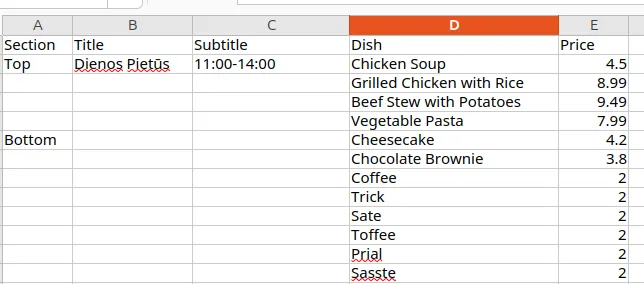
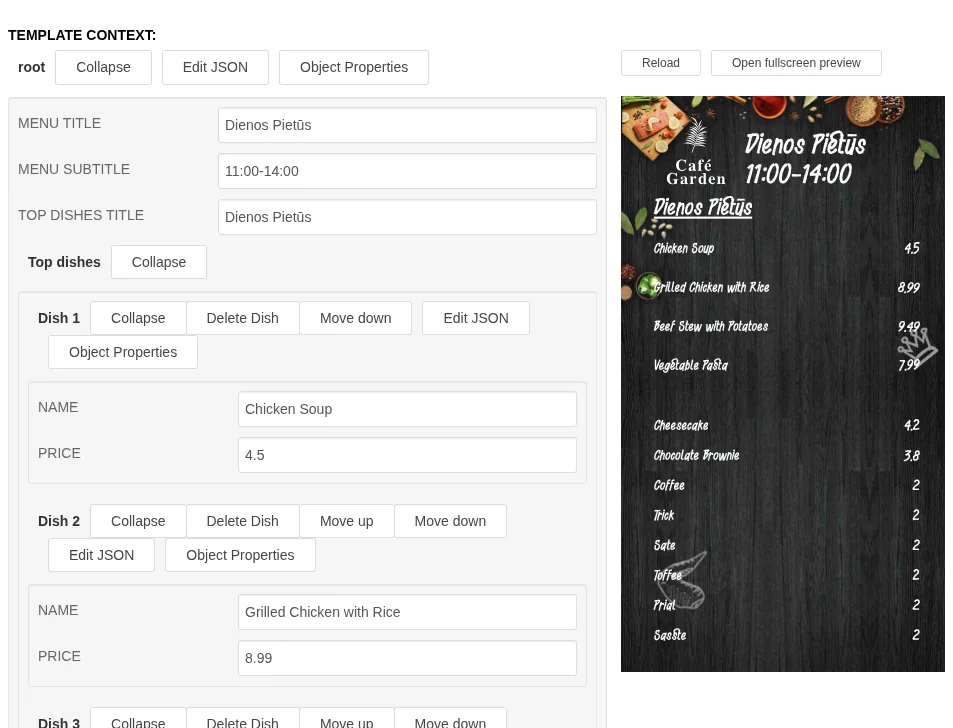
Spreadsheet with a lunch menu: section, dish and price columnsThe lunch menu as a parametrized template: a form with dish and price fields beside the finished menu board

Templates written from one sentence

Describe a price board, a menu or a KPI dashboard, or show the agent a picture. It writes an HTML template with editable fields and binds it to live data such as weather, time, prices or Power BI.

After that, only the data changes: set the soup price to 6 EUR, and the menu design stays exactly as it was.

Dynamic templates

Everything a screen network needs

The AI agent sits on a complete digital signage platform, in use on thousands of screens.

Content and scheduling

A drag-and-drop dashboard, cron-style schedules, smart transcoding and data-driven content.

Delivery and offline playback

Peer-to-peer delivery inside each site, and players that keep playing when the network drops.

Device management

Remote updates, hardware control, tamper-proof mode and issue detection with alerts.

Measurement and security

Proof of play, GDPR-compliant audience analytics and enterprise-grade security.

Runs on the screens you have

LG webOS, Samsung Tizen, Android, BrightSign, Raspberry Pi, x86 and ARM boards, desktop and browsers; in the cloud or on your own infrastructure.

All featuresEvery capability, grouped, with beta and upcoming features marked.See all features

For integrators & resellers

Offer impressBox to your customers under your own brand, with partner pricing on request. Tell us about your business and we will get back to you.

0 + 0 = ?

Frequently asked questions

What is impressBox?

impressBox is a digital signage CMS with a built-in AI agent. You manage content, playlists, schedules and screens in a web dashboard, or ask the agent in plain language from the dashboard chat, WhatsApp, Slack, or Claude and other AI tools via MCP.

What can the impressBox AI Agent do?

It creates and edits content, writes HTML templates from a prompt, publishes and schedules playlists, checks device status, and diagnoses and fixes devices. See AI Agent.

Does impressBox have an MCP server?

Yes. The impressBox MCP server has more than 100 tools (114 as of 24 September 2026) for devices and diagnostics, content and templates, playlists and publishing, and organization. See MCP server.

Which screens does impressBox support?

LG webOS 3 to 8, Samsung Tizen, Android displays from Hikvision, Sony, Philips and iiyama, Android TV, BrightSign, Raspberry Pi 4 and 5, Intel/AMD x86 and ARM boards with balenaOS, Windows, Linux and macOS, and web browsers. See supported hardware.

How much does impressBox cost?

From €15 per screen per month for the software player and from €19 per month for a managed player with hardware, on a 36-month term, excluding VAT. See pricing.

Who uses impressBox?

More than 5,000 screens in the Baltics are managed with impressBox, including the screen.club retail media network in IKI supermarkets, Narvesen convenience stores and Caffeine coffee shops. See customers.

See impressBox on your own screens

Book a demo: we walk you through the dashboard, the AI agent and the players, and answer your questions about your network.